What is SSL/TLS?
SSL (Secure Sockets Layer) and its successor TLS (Transport Layer Security) are protocols for establishing authenticated and encrypted links between networked computers.
SSL vs TLS
Although widely known as "SSL", the actual protocol in use today is TLS (currently TLS 1.2 or 1.3). SSL 3.0 was deprecated in 2015 due to security vulnerabilities. However, the term "SSL" persists in industry jargon.
It solves three main problems:
Encryption
Hides data from eavesdroppers.
Authentication
Verifies you are talking to the real server.
Integrity
Ensures data hasn't been tampered with.
How It Works
SSL/TLS works using a technology called Public Key Infrastructure (PKI). This system depends on two types of keys:
- Public Key: Can be shared with anyone. Used to encrypt data.
- Private Key: Kept secret by the server. Used to decrypt data encrypted by the public key.
Think of it like a mailbox: anyone can drop a letter in (encrypt with public key), but only the person with the key can open it (decrypt with private key).
The Handshake
Before any data is sent, the client (your browser/app) and the server perform a "Handshake" to negotiate security settings and authenticate the server.
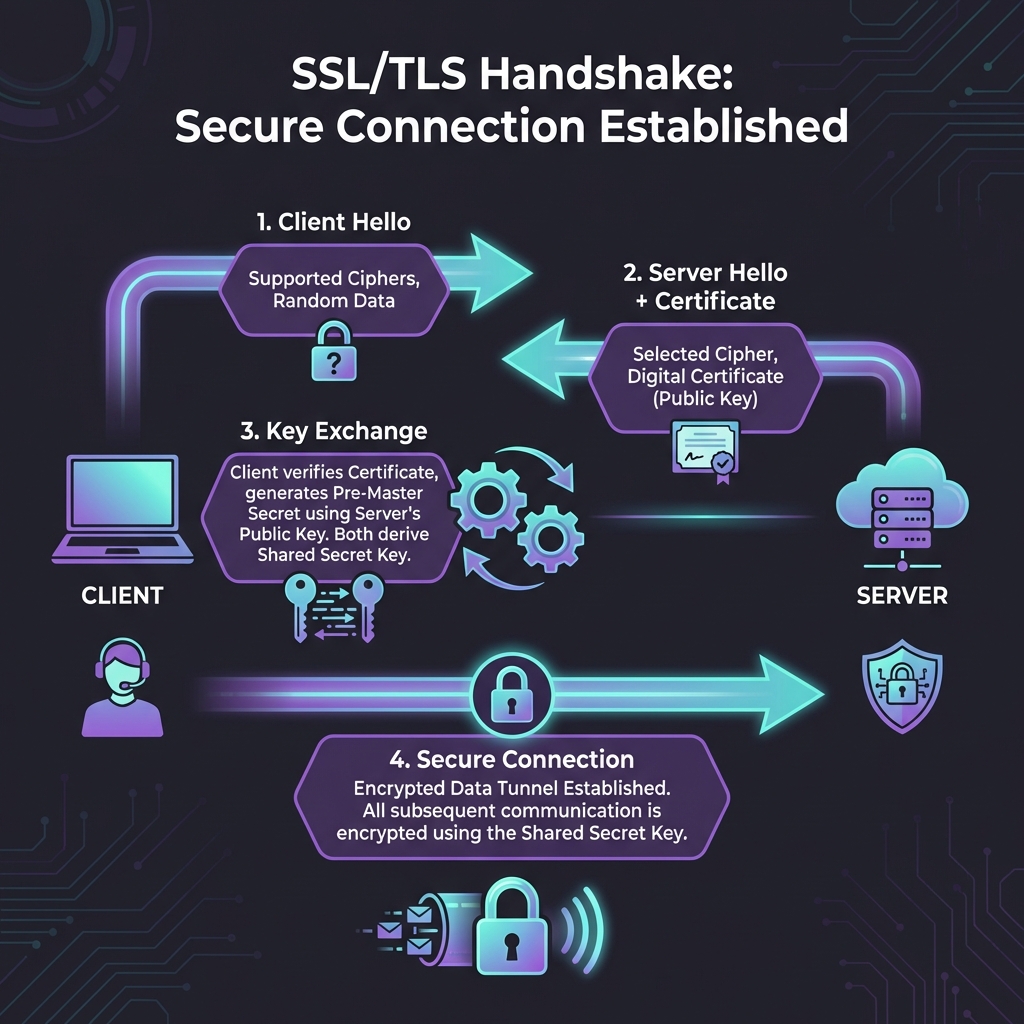
- Client Hello: The client sends a message listing supported SSL/TLS versions and cipher suites.
- Server Hello: The server chooses a cipher suite and sends its digital certificate (containing its public key).
- Verification: The client checks if the certificate is valid, not expired, and issued by a trusted CA.
- Key Exchange: The client generates a random "session key", encrypts it with the server's public key, and sends it back.
- Secure Connection: The server decrypts the session key. Now both parties have the same "session key" and use it for fast symmetric encryption.
Anatomy of a Certificate
A digital certificate (X.509) is like a passport for a website. It contains specific information that SSLens allows you to inspect:
| Field | Description | Why it matters |
|---|---|---|
| Subject | Who owns the cert (CN, O, C) | Ensures you're on google.com, not a fake site. |
| Issuer | Who verified the owner (The CA) | Trust depends on the issuer being reliable (e.g., DigiCert, Let's Encrypt). |
| Validity | Dates (Not Before / Not After) | Certificates expire! An expired cert triggers security warnings. |
| SANs | Subject Alternative Names | Lists all other domains this single certificate protects. |
| Public Key | The encryption key itself | This is what we "pin" in SSL Pinning. |
Why Pinning Matters
In mobile development, simply trusting the system's certificate store isn't always enough. A compromised Device or CA could allow attackers to intercept traffic.
SSL Pinning (or Certificate Pinning) hardcodes the expected certificate's "fingerprint" or "public key hash" into your app. If the server presents a certificate that doesn't match this pin, the app refuses to connect.
SSLens helps you generate these pins easily. Check out the SSL Pinning Guide to learn more.
Ready to inspect?
Now that you understand the basics, use SSLens to inspect real-world certificates and see these concepts in action.
Get Started